
- IT (1750)

오늘도 공부
2. Simple Agent (AI 에이전트 기초) 본문
GitHub - MiniMax-AI/Mini-Agent: A minimal yet professional single agent demo project that showcases the core execution pipeline
A minimal yet professional single agent demo project that showcases the core execution pipeline and production-grade features of agents. - MiniMax-AI/Mini-Agent
github.com
"""Example 2: Simple Agent Usage

This example demonstrates how to create and run a basic agent
to perform simple file operations.

Based on: tests/test_agent.py
"""

import asyncio
import tempfile
from pathlib import Path

from mini_agent import LLMClient
from mini_agent.agent import Agent
from mini_agent.config import Config
from mini_agent.tools import BashTool, EditTool, ReadTool, WriteTool


async def demo_file_creation():
    """Demo: Agent creates a file based on user request."""
    print("\n" + "=" * 60)
    print("Demo: Agent-Driven File Creation")
    print("=" * 60)

    # Load configuration
    config_path = Path("mini_agent/config/config.yaml")
    if not config_path.exists():
        print("❌ config.yaml not found. Please set up your API key first.")
        print("   Run: cp mini_agent/config/config-example.yaml mini_agent/config/config.yaml")
        return

    config = Config.from_yaml(config_path)

    # Check API key
    if not config.llm.api_key or config.llm.api_key.startswith("YOUR_"):
        print("❌ API key not configured in config.yaml")
        return

    # Create temporary workspace
    with tempfile.TemporaryDirectory() as workspace_dir:
        print(f"📁 Workspace: {workspace_dir}\n")

        # Load system prompt (Agent will auto-inject workspace info)
        system_prompt_path = Path("mini_agent/config/system_prompt.md")
        if system_prompt_path.exists():
            system_prompt = system_prompt_path.read_text(encoding="utf-8")
        else:
            system_prompt = "You are a helpful AI assistant that can use tools."

        # Initialize LLM client
        llm_client = LLMClient(
            api_key=config.llm.api_key,
            api_base=config.llm.api_base,
            model=config.llm.model,
        )

        # Initialize tools
        tools = [
            ReadTool(workspace_dir=workspace_dir),
            WriteTool(workspace_dir=workspace_dir),
            EditTool(workspace_dir=workspace_dir),
            BashTool(),
        ]

        # Create agent
        agent = Agent(
            llm_client=llm_client,
            system_prompt=system_prompt,
            tools=tools,
            max_steps=10,
            workspace_dir=workspace_dir,
        )

        # Task: Create a Python hello world file
        task = """
        Create a Python file named 'hello.py' that:
        1. Defines a function called greet(name)
        2. The function prints "Hello, {name}!"
        3. Calls the function with name="Mini Agent"
        """

        print("📝 Task:")
        print(task)
        print("\n" + "=" * 60)
        print("🤖 Agent is working...\n")

        agent.add_user_message(task)

        try:
            result = await agent.run()

            print("\n" + "=" * 60)
            print("✅ Agent completed the task!")
            print("=" * 60)
            print(f"\nAgent's response:\n{result}\n")

            # Check if file was created
            hello_file = Path(workspace_dir) / "hello.py"
            if hello_file.exists():
                print("=" * 60)
                print("📄 Created file content:")
                print("=" * 60)
                print(hello_file.read_text())
                print("=" * 60)
            else:
                print("⚠️  File was not created (but agent may have completed differently)")

        except Exception as e:
            print(f"❌ Error: {e}")
            import traceback

            traceback.print_exc()


async def demo_bash_task():
    """Demo: Agent executes bash commands."""
    print("\n" + "=" * 60)
    print("Demo: Agent-Driven Bash Commands")
    print("=" * 60)

    # Load configuration
    config_path = Path("mini_agent/config/config.yaml")
    if not config_path.exists():
        print("❌ config.yaml not found")
        return

    config = Config.from_yaml(config_path)

    if not config.llm.api_key or config.llm.api_key.startswith("YOUR_"):
        print("❌ API key not configured")
        return

    with tempfile.TemporaryDirectory() as workspace_dir:
        print(f"📁 Workspace: {workspace_dir}\n")

        # Load system prompt (Agent will auto-inject workspace info)
        system_prompt_path = Path("mini_agent/config/system_prompt.md")
        if system_prompt_path.exists():
            system_prompt = system_prompt_path.read_text(encoding="utf-8")
        else:
            system_prompt = "You are a helpful AI assistant that can use tools."

        # Initialize LLM
        llm_client = LLMClient(
            api_key=config.llm.api_key,
            api_base=config.llm.api_base,
            model=config.llm.model,
        )

        # Tools
        tools = [
            ReadTool(workspace_dir=workspace_dir),
            WriteTool(workspace_dir=workspace_dir),
            BashTool(),
        ]

        # Create agent
        agent = Agent(
            llm_client=llm_client,
            system_prompt=system_prompt,
            tools=tools,
            max_steps=10,
            workspace_dir=workspace_dir,
        )

        # Task: Use bash to get system info
        task = """
        Use bash commands to:
        1. Show the current date and time
        2. List all Python files in the current directory
        3. Count how many Python files exist
        """

        print("📝 Task:")
        print(task)
        print("\n" + "=" * 60)
        print("🤖 Agent is working...\n")

        agent.add_user_message(task)

        try:
            result = await agent.run()

            print("\n" + "=" * 60)
            print("✅ Agent completed!")
            print("=" * 60)
            print(f"\nAgent's response:\n{result}\n")

        except Exception as e:
            print(f"❌ Error: {e}")


async def main():
    """Run all demos."""
    print("=" * 60)
    print("Simple Agent Usage Examples")
    print("=" * 60)
    print("\nThese examples show how to create an agent and give it tasks.")
    print("The agent uses LLM to decide which tools to call.\n")

    # Run demos
    await demo_file_creation()
    print("\n" * 2)
    await demo_bash_task()

    print("\n" + "=" * 60)
    print("All demos completed! ✅")
    print("=" * 60)


if __name__ == "__main__":
    asyncio.run(main())
02_simple_agent.py 해설: 가장 작은 Agent 루프를 해부하기
이 글은 examples/02_simple_agent.py를 “에이전트 실행 루프가 실제로 어떻게 돌아가는지”를 관찰하는 실습 노트 형태로 풀어냅니다.
01에서 도구를 직접 호출했다면, 02부터는 LLM이 도구를 선택하고, 런타임이 tool call을 실제 실행하는 전체 흐름을 보게 됩니다.
TL;DR
- 이 예제는 Agent를 직접 구성해 agent.run()으로 작업을 수행합니다.
- Agent는 “모델 응답에 tool_calls가 있으면 도구를 실행하고, 없으면 종료”라는 단순한 규칙을 반복합니다.
- 파일 도구는 임시 워크스페이스에서, bash 도구는 기본 cwd에서 실행되는 점이 포인트(의도적으로 관찰해볼 만함).
준비: API 키 설정
이 예제는 mini_agent/config/config.yaml을 직접 경로로 찾습니다(자동 탐색 아님).
cp mini_agent/config/config-example.yaml mini_agent/config/config.yaml
mini_agent/config/config.yaml에서 api_key를 채우세요.
실행 방법
uv run python examples/02_simple_agent.py
예제 구성(두 개의 데모)
1) demo_file_creation(): “Agent가 파일을 만들게 하기”
목표는 단순합니다.
- 사용자 메시지(요구사항)를 agent.add_user_message(...)로 추가
- agent.run()을 호출해, 모델이 도구를 호출하고 결과를 바탕으로 작업을 끝내도록 둠
코드에서 실제로 눈여겨볼 지점은 아래입니다.
(1) 설정 로딩은 고정 경로
config_path = Path("mini_agent/config/config.yaml")
config = Config.from_yaml(config_path)
이 방식은 “개발 편의”에는 좋지만, 설치형 CLI(mini-agent)처럼 ~/.mini-agent/config/를 탐색하지 않습니다.
즉, 이 예제는 레포 로컬에 config.yaml이 있어야 합니다.
(2) 워크스페이스는 임시 디렉터리
with tempfile.TemporaryDirectory() as workspace_dir:
이게 중요한 이유:
- 파일 도구 ReadTool/WriteTool/EditTool은 workspace_dir를 기준으로 상대경로를 해석합니다.
- 예제가 만든 파일은 레포에 남지 않고, 데모가 끝나면 워크스페이스도 사라집니다.
(3) 시스템 프롬프트는 “파일 그대로” 로딩
system_prompt = Path("mini_agent/config/system_prompt.md").read_text(...)
system_prompt.md에는 {SKILLS_METADATA} 플레이스홀더가 있는데, 이 예제는 CLI처럼 스킬 메타데이터를 주입하지 않습니다.
따라서 “스킬까지 포함한 완성형 런타임”을 보고 싶다면 04_full_agent.py나 mini-agent CLI 흐름을 보거나, 이 예제에 주입 로직을 추가하는 실험을 해볼 수 있습니다.
(4) LLMClient 생성: provider는 기본값
llm_client = LLMClient(
    api_key=config.llm.api_key,
    api_base=config.llm.api_base,
    model=config.llm.model,
)
config.yaml에는 provider:가 있지만, 여기서는 provider를 넘기지 않아서 기본 provider(Anthropic) 로 동작합니다.
provider 전환을 공부하려면 05_provider_selection.py가 더 직접적입니다.
(5) 도구 목록을 주고 Agent를 만든다
tools = [ReadTool(...), WriteTool(...), EditTool(...), BashTool()]
agent = Agent(llm_client=llm_client, system_prompt=system_prompt, tools=tools, ...)
여기서 Agent를 공부할 때 가장 좋은 관찰 포인트는:
- “어떤 도구가 목록에 있느냐”가 모델의 행동 공간을 결정한다
- “도구 description/parameters(스키마)”가 모델의 호출 품질을 결정한다
2) demo_bash_task(): “Agent가 bash로 시스템 정보를 얻기”
두 번째 데모는 bash 사용을 강조합니다.
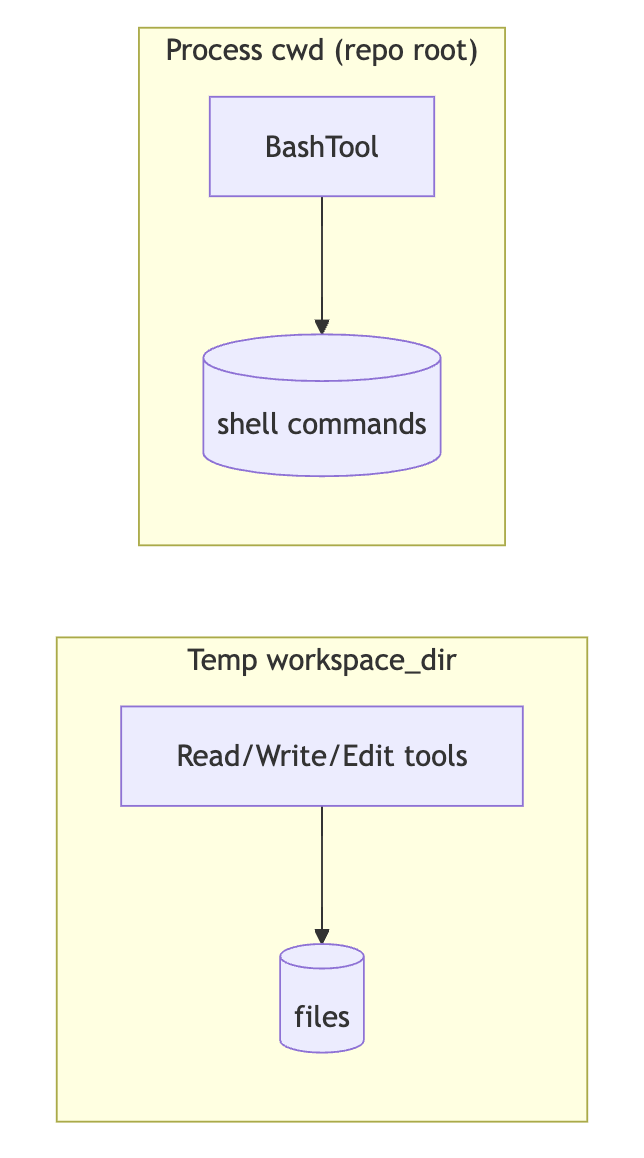
여기서 은근히 중요한 점이 하나 있습니다.
- BashTool()은 workspace_dir를 주지 않았기 때문에, 기본적으로 현재 프로세스의 cwd에서 실행됩니다.
- 반면 파일 도구는 workspace_dir 기준으로 동작합니다.
즉, “파일 생성은 임시 workspace”, “bash는 레포 루트”처럼 서로 다른 공간에서 일어날 수 있습니다.
이 차이를 의도적으로 만들면, Agent가 “어디에서 무엇을 실행해야 하는지”를 더 명시적으로 생각하게 만들 수 있습니다(운영 수준에서는 오히려 혼동이 될 수 있어 한쪽으로 통일하는 편이 일반적).
Agent.run()을 mental model로 이해하기
Agent의 내부 루프는 대략 다음 규칙으로 동작합니다(mini_agent/agent.py 참고).

- 메시지 히스토리(시스템/유저/어시스턴트/툴)를 모델에 보냄
- 모델이 답변(content/thinking)과 tool_calls를 반환
- tool_calls가 없으면 “작업 완료”로 간주하고 종료
- tool_calls가 있으면 각 툴을 실행해 결과를 tool 메시지로 히스토리에 추가
- 다음 스텝으로 반복(최대 스텝 수 제한)
여기서 중요한 건, Agent는 “정답을 아는 존재”가 아니라 반복 실행기라는 점입니다.
성능/안정성은 대부분:
- 프롬프트(규칙/제약)
- 도구 설계(스키마/결과 포맷/에러)
- 실행 환경(워크스페이스/권한)
이 세 가지에 의해 좌우됩니다.
실습 과제(공부용)
- bash도 임시 워크스페이스에서 실행되게 만들기
BashTool(workspace_dir=workspace_dir)로 바꾸고, Agent에게 “생성한 hello.py를 bash로 실행”시키는 과제를 추가해보세요. - provider를 config에 맞게 따르게 만들기
config.llm.provider 값을 읽어 LLMProvider로 변환해 LLMClient(..., provider=...)로 넘겨보세요. - “작업 완료 기준”을 관찰하기
task를 조금 더 모호하게 바꿔서(예: “아무 파일 하나 만들고 끝내”) tool_calls가 사라지는 시점을 관찰해보세요.
흔한 문제
- config.yaml not found
- mini_agent/config/config.yaml이 없다는 뜻입니다(예제는 고정 경로).
- API key not configured
- api_key가 YOUR_... 형태로 남아있거나 비어있습니다.
다음 글 안내
다음 문서인 examples/docs/03_session_notes.md에서는 “대화 히스토리”와 별개로, 파일에 저장되는 record_note/recall_notes 기반의 지속 메모리(persistent memory) 를 어떻게 Agent에 붙이는지 살펴봅니다.
'AI > Agent' 카테고리의 다른 글
| 6. AI Agent가 사용하는 Tool 스키마 (0) | 2026.02.23 |
|---|---|
| 5. Provider 선택자 만들기 (0) | 2026.02.23 |
| 4. Ai Agent에 세션 + MCP까지 적용 (0) | 2026.02.23 |
| 3. session_notes로 공부하는 AI 에이전트 세션 관리 (0) | 2026.02.23 |
| 1. basic_tools (AI 에이전트 기초) (0) | 2026.02.23 |


