
- IT (1549)

오늘도 공부
4. Ai Agent에 세션 + MCP까지 적용 본문
GitHub - MiniMax-AI/Mini-Agent: A minimal yet professional single agent demo project that showcases the core execution pipeline
A minimal yet professional single agent demo project that showcases the core execution pipeline and production-grade features of agents. - MiniMax-AI/Mini-Agent
github.com
"""Example 4: Full Agent with All Features

This example demonstrates a complete agent setup with:
- All basic tools (Read, Write, Edit, Bash)
- Session Note tools for memory
- MCP tools (Memory, Search, etc.)
- Skills integration

Based on: tests/test_integration.py
"""

import asyncio
import tempfile
from pathlib import Path

from mini_agent import LLMClient
from mini_agent.agent import Agent
from mini_agent.config import Config
from mini_agent.tools import BashTool, EditTool, ReadTool, WriteTool
from mini_agent.tools.mcp_loader import load_mcp_tools_async
from mini_agent.tools.note_tool import RecallNoteTool, SessionNoteTool


async def demo_full_agent():
    """Demo: Full-featured agent with all capabilities."""
    print("\n" + "=" * 60)
    print("Full Mini Agent - All Features Enabled")
    print("=" * 60)

    # Load configuration
    config_path = Path("mini_agent/config/config.yaml")
    if not config_path.exists():
        print("❌ config.yaml not found. Please run:")
        print("   cp mini_agent/config/config-example.yaml mini_agent/config/config.yaml")
        return

    config = Config.from_yaml(config_path)

    # Check API key
    if not config.llm.api_key or config.llm.api_key.startswith("YOUR_"):
        print("❌ API key not configured in config.yaml")
        return

    # Create workspace
    with tempfile.TemporaryDirectory() as workspace_dir:
        print(f"📁 Workspace: {workspace_dir}")

        # Load system prompt (Agent will auto-inject workspace info)
        system_prompt_path = Path("mini_agent/config/system_prompt.md")
        if system_prompt_path.exists():
            system_prompt = system_prompt_path.read_text(encoding="utf-8")
        else:
            system_prompt = "You are a helpful AI assistant."

        # Add Session Note instructions
        note_instructions = """

IMPORTANT - Session Memory:
You have record_note and recall_notes tools. Use them to:
- Save important facts, decisions, and context
- Recall previous information across conversations
"""
        system_prompt += note_instructions

        # Initialize LLM
        llm_client = LLMClient(
            api_key=config.llm.api_key,
            api_base=config.llm.api_base,
            model=config.llm.model,
        )

        # Initialize basic tools
        tools = [
            ReadTool(workspace_dir=workspace_dir),
            WriteTool(workspace_dir=workspace_dir),
            EditTool(workspace_dir=workspace_dir),
            BashTool(),
        ]
        print("✓ Loaded 4 basic tools")

        # Add Session Note tools
        memory_file = Path(workspace_dir) / ".agent_memory.json"
        tools.extend(
            [
                SessionNoteTool(memory_file=str(memory_file)),
                RecallNoteTool(memory_file=str(memory_file)),
            ]
        )
        print("✓ Loaded 2 Session Note tools")

        # Load MCP tools (if configured)
        try:
            mcp_tools = await load_mcp_tools_async(config_path="mini_agent/config/mcp.json")
            if mcp_tools:
                tools.extend(mcp_tools)
                print(f"✓ Loaded {len(mcp_tools)} MCP tools")
            else:
                print("⚠️  No MCP tools configured (mcp.json is empty or disabled)")
        except Exception as e:
            print(f"⚠️  MCP tools not loaded: {e}")

        # Create agent
        agent = Agent(
            llm_client=llm_client,
            system_prompt=system_prompt,
            tools=tools,
            max_steps=config.agent.max_steps,
            workspace_dir=workspace_dir,
        )

        print(f"\n🤖 Agent created with {len(tools)} total tools\n")

        # Task: Complex task that uses multiple tools
        task = """
        Please help me with the following tasks:

        1. Create a Python script called 'calculator.py' that:
           - Has functions for add, subtract, multiply, divide
           - Has a main() function that demonstrates usage
           - Includes proper docstrings and type hints

        2. Create a README.md file that:
           - Describes the calculator script
           - Shows how to run it
           - Lists the available functions

        3. Test the calculator by running it with bash

        4. Remember this project info:
           - Project: Simple Calculator
           - Language: Python
           - Purpose: Demonstration of agent capabilities
        """

        print("=" * 60)
        print("📝 Task:")
        print("=" * 60)
        print(task)
        print("\n" + "=" * 60)
        print("🤖 Agent is working...\n")

        agent.add_user_message(task)

        try:
            result = await agent.run()

            print("\n" + "=" * 60)
            print("✅ Agent completed!")
            print("=" * 60)
            print(f"\nAgent's final response:\n{result}\n")

            # Show created files
            print("=" * 60)
            print("📄 Created files in workspace:")
            print("=" * 60)

            workspace = Path(workspace_dir)
            for file in workspace.glob("*"):
                if file.is_file() and not file.name.startswith("."):
                    print(f"\n📄 {file.name}:")
                    print("-" * 60)
                    content = file.read_text()
                    # Show first 20 lines
                    lines = content.split("\n")[:20]
                    print("\n".join(lines))
                    if len(content.split("\n")) > 20:
                        print("... (truncated)")
                    print("-" * 60)

            # Show memory
            if memory_file.exists():
                import json

                notes = json.loads(memory_file.read_text())
                print(f"\n💾 Session notes recorded: {len(notes)}")
                for note in notes:
                    print(f"  - [{note['category']}] {note['content'][:60]}...")

        except Exception as e:
            print(f"❌ Error during agent execution: {e}")
            import traceback

            traceback.print_exc()


async def demo_interactive_mode():
    """Demo: Interactive conversation with agent."""
    print("\n" + "=" * 60)
    print("Interactive Mini Agent")
    print("=" * 60)
    print("\nThis demo shows multi-turn conversation.")
    print("(In production, use `mini-agent` for full interactive mode)")

    # Load config
    config_path = Path("mini_agent/config/config.yaml")
    if not config_path.exists():
        print("❌ config.yaml not found")
        return

    config = Config.from_yaml(config_path)

    if not config.llm.api_key or config.llm.api_key.startswith("YOUR_"):
        print("❌ API key not configured")
        return

    with tempfile.TemporaryDirectory() as workspace_dir:
        # Setup
        system_prompt = "You are a helpful assistant with access to tools."
        llm_client = LLMClient(
            api_key=config.llm.api_key,
            api_base=config.llm.api_base,
            model=config.llm.model,
        )

        tools = [
            WriteTool(workspace_dir=workspace_dir),
            ReadTool(workspace_dir=workspace_dir),
            BashTool(),
        ]

        agent = Agent(
            llm_client=llm_client,
            system_prompt=system_prompt,
            tools=tools,
            max_steps=20,
            workspace_dir=workspace_dir,
        )

        # Conversation turns
        conversations = [
            "Create a file called 'data.txt' with the numbers 1 to 5, one per line.",
            "Now read the file and tell me what's in it.",
            "Count how many lines are in the file using bash.",
        ]

        for i, message in enumerate(conversations, 1):
            print(f"\n{'=' * 60}")
            print(f"Turn {i}:")
            print(f"{'=' * 60}")
            print(f"User: {message}\n")

            agent.add_user_message(message)

            try:
                result = await agent.run()
                print(f"Agent: {result}\n")
            except Exception as e:
                print(f"Error: {e}")
                break


async def main():
    """Run all demos."""
    print("=" * 60)
    print("Full Agent Examples")
    print("=" * 60)
    print("\nThese examples demonstrate the complete agent capabilities:")
    print("- All basic tools (file operations, bash)")
    print("- Session memory (persistent notes)")
    print("- MCP tools (if configured)")
    print("- Multi-turn conversations\n")

    # Run demos
    await demo_full_agent()
    print("\n" * 2)
    await demo_interactive_mode()

    print("\n" + "=" * 60)
    print("All demos completed! ✅")
    print("=" * 60)
    print("\n💡 Next step: Try the interactive mode with:")
    print("   mini-agent\n")


if __name__ == "__main__":
    asyncio.run(main())
04_full_agent.py 해설: “풀 스택” 에이전트 데모로 확장하기
이 글은 examples/04_full_agent.py를 기반으로, Mini Agent 데모를 “운영에 가까운 구성”으로 확장하는 흐름을 설명합니다.
02가 최소 Agent 루프였다면, 04는 다음을 한 자리에 모읍니다.
- 기본 도구(파일/쉘)
- 세션 노트(지속 메모리)
- MCP(확장 도구, 선택)
- 멀티 턴 대화 시뮬레이션

TL;DR
- demo_full_agent()는 “복합 작업 + 기억 + (선택) MCP”까지 포함한 통합 데모입니다.
- demo_interactive_mode()는 한 Agent 인스턴스로 여러 턴을 흉내냅니다(각 턴마다 agent.run() 호출).
- 핵심 학습 포인트는 “도구가 늘어날수록 프롬프트/스키마/환경 통제가 중요해진다”입니다.
실행 방법
uv run python examples/04_full_agent.py
필수:
- mini_agent/config/config.yaml에 API 키 설정
선택(MCP 실습):
- mini_agent/config/mcp.json 설정(없으면 템플릿 mcp-example.json로 fallback되지만 기본은 disabled)
Demo 1: demo_full_agent() 구조 해부
1) 설정/키 확인은 고정 경로
이 예제도 mini_agent/config/config.yaml을 고정 경로로 찾습니다.
config_path = Path("mini_agent/config/config.yaml")
config = Config.from_yaml(config_path)
즉, CLI(mini-agent)처럼 홈 디렉터리 탐색 로직을 타지 않습니다.
2) 워크스페이스는 임시 디렉터리
with tempfile.TemporaryDirectory() as workspace_dir:
여기서 Agent가 만드는 파일(calculator.py, README.md, .agent_memory.json)은 임시 폴더 안에 생성됩니다.
데모 종료 후엔 사라지는 구조라 “안전하게 실험”하기에 좋습니다.
3) system_prompt + “메모리 정책”을 합성한다
예제는 기본 시스템 프롬프트를 읽은 뒤, 세션 메모리 사용 규칙을 문자열로 덧붙입니다.
- “record_note / recall_notes 도구가 있다”
- “중요한 사실/결정을 저장하고 회상하라”
이 방식의 장점:
- Agent 행동을 바꾸는 가장 빠른 방법이 프롬프트이기 때문
한계:
- 모델이 100% 반드시 실행하는 건 아니므로, 운영에서는 “턴 시작 시 자동 recall” 같은 강제 정책을 고려하게 됩니다.
4) tools를 “기능 묶음”으로 구성한다
이 예제는 도구들을 세 단계로 쌓습니다.
- 기본 도구(파일/쉘)
- 세션 노트 도구(지속 메모리)
- MCP 도구(선택)
여기서 “tools를 늘리는 것” 자체가 목표가 아니라, 도구가 늘수록 모델이 더 헷갈릴 수 있다는 점이 핵심입니다.
따라서 각 도구의 description과 parameters가 더 중요해집니다(06에서 자세히 다룹니다).
5) MCP 도구: 플러그인 시스템의 감각을 잡기
mcp_tools = await load_mcp_tools_async(config_path="mini_agent/config/mcp.json")
이 호출은 다음을 수행합니다(mini_agent/tools/mcp_loader.py 참고).
- mcp.json을 읽고 서버 목록을 확인
- disabled가 아닌 서버에 연결(stdio/sse/http 지원)
- 각 MCP 서버가 제공하는 tool 정의를 받아 Tool로 래핑
중요한 현실 포인트:
- mcp.json이 없어도 mcp-example.json로 fallback될 수 있습니다.
- 예제 템플릿은 대부분 disabled: true이므로, “연결은 안 하고 넘어가는” 상태가 기본입니다.
6) 복합 작업: 모델이 도구를 오케스트레이션하는지 관찰
task는 일부러 “여러 산출물 + 실행 + 기억”을 섞습니다.
- calculator.py 생성(타입힌트/독스트링 포함)
- README.md 작성
- bash로 실행 테스트
- 프로젝트 정보를 record_note로 저장
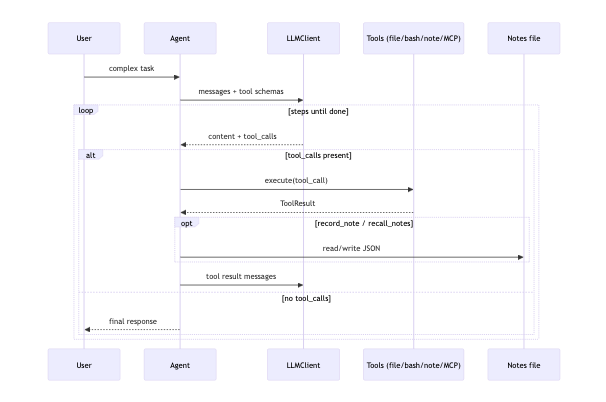
Agent 관점에서 볼 때 좋은 관찰 포인트:
- 파일 생성: write_file를 쓰는지, edit_file를 쓰는지
- 테스트 실행: bash에서 cd를 어떻게 처리하는지
- BashTool은 기본 cwd에서 실행되므로, 임시 workspace로 이동하려면 cd <workspace>를 명시해야 합니다.
- Agent는 system prompt에 “Current Workspace(절대 경로)”가 주입되므로 이를 활용할 수 있습니다.
- 기억 저장: 어떤 정보를 category로 저장하는지
7) 데모가 끝난 뒤 “증거”를 출력한다
예제는 작업이 끝나면 워크스페이스의 생성 파일을 나열하고, 각 파일의 앞부분을 출력합니다.
이건 에이전트 개발에서 매우 중요한 습관입니다.
- “모델이 완료했다”가 아니라
- “결과물이 실제로 만들어졌는지”를 확인해야 합니다.
Demo 2: demo_interactive_mode()로 멀티 턴 감각 잡기
이 데모는 진짜 인터랙티브 CLI가 아니라, “3턴 대화”를 스크립트로 흉내냅니다.
핵심은:
- 한 Agent 인스턴스를 만들고
- 턴마다 agent.add_user_message(...) 후
- await agent.run()을 호출한다
여기서 Agent 공부 포인트는 다음입니다.
- agent.messages가 계속 누적되므로 “멀티 턴”이 된다
- 턴이 길어지면(많은 턴) 컨텍스트 관리가 필요해지고, 이 프로젝트는 “요약(summarization)”로 대응하는 경로가 있다(mini_agent/agent.py)
실습 과제(공부용)
- MCP 서버를 하나 실제로 켜보기
mini_agent/config/mcp-example.json을 복사한 뒤 특정 서버의 disabled를 false로 바꾸고, 필요한 env를 채워 실행해보세요. - “메모리 회상”을 강제하는 정책을 추가해보기
턴 시작 시 recall_notes를 반드시 호출하도록 프롬프트를 강화하거나, 런타임에서 선행 호출하도록 코드를 바꿔보세요. - tool 수가 늘어날 때의 혼동을 관찰하기
도구를 일부러 더 추가(예: translate, summarize 등)한 뒤, 모델이 “적절한 도구”를 고르는지 확인해보세요.
다음 글 안내
- provider 전환(Anthropic/OpenAI 프로토콜 차이)을 이해하려면 examples/docs/05_provider_selection.md
- 도구 스키마(JSON Schema)가 모델 행동을 어떻게 제약/유도하는지 보려면 examples/docs/06_tool_schema_demo.md
'AI > Agent' 카테고리의 다른 글
| 6. AI Agent가 사용하는 Tool 스키마 (0) | 2026.02.23 |
|---|---|
| 5. Provider 선택자 만들기 (0) | 2026.02.23 |
| 3. session_notes로 공부하는 AI 에이전트 세션 관리 (0) | 2026.02.23 |
| 2. Simple Agent (AI 에이전트 기초) (0) | 2026.02.23 |
| 1. basic_tools (AI 에이전트 기초) (0) | 2026.02.23 |


