
- IT (1549)

오늘도 공부
1. basic_tools (AI 에이전트 기초) 본문
Minimax miniagent를 참고해서 에이전트 소스를 보고 분석 공부하도록 하겠습니다.
GitHub - MiniMax-AI/Mini-Agent: A minimal yet professional single agent demo project that showcases the core execution pipeline
A minimal yet professional single agent demo project that showcases the core execution pipeline and production-grade features of agents. - MiniMax-AI/Mini-Agent
github.com
"""Example 1: Basic Tools Usage

This example demonstrates how to use the basic tools:
- ReadTool: Read file contents
- WriteTool: Create new files
- EditTool: Edit existing files
- BashTool: Execute bash commands

Based on: tests/test_tools.py
"""

import asyncio
import tempfile
from pathlib import Path

from mini_agent.tools import BashTool, EditTool, ReadTool, WriteTool


async def demo_write_tool():
    """Demo: Write a new file."""
    print("\n" + "=" * 60)
    print("Demo 1: WriteTool - Create a new file")
    print("=" * 60)

    with tempfile.TemporaryDirectory() as tmpdir:
        file_path = Path(tmpdir) / "hello.txt"

        tool = WriteTool()
        result = await tool.execute(
            path=str(file_path), content="Hello, Mini Agent!\nThis is a test file."
        )

        if result.success:
            print(f"✅ File created: {file_path}")
            print(f"Content:\n{file_path.read_text()}")
        else:
            print(f"❌ Failed: {result.error}")


async def demo_read_tool():
    """Demo: Read a file."""
    print("\n" + "=" * 60)
    print("Demo 2: ReadTool - Read file contents")
    print("=" * 60)

    with tempfile.NamedTemporaryFile(mode="w", delete=False, suffix=".txt") as f:
        f.write("Line 1: Hello\nLine 2: World\nLine 3: Mini Agent")
        temp_path = f.name

    try:
        tool = ReadTool()
        result = await tool.execute(path=temp_path)

        if result.success:
            print(f"✅ File read successfully")
            print(f"Content:\n{result.content}")
        else:
            print(f"❌ Failed: {result.error}")
    finally:
        Path(temp_path).unlink()


async def demo_edit_tool():
    """Demo: Edit an existing file."""
    print("\n" + "=" * 60)
    print("Demo 3: EditTool - Edit file content")
    print("=" * 60)

    with tempfile.NamedTemporaryFile(mode="w", delete=False, suffix=".txt") as f:
        f.write("Python is great!\nI love Python programming.")
        temp_path = f.name

    try:
        print(f"Original content:\n{Path(temp_path).read_text()}\n")

        tool = EditTool()
        result = await tool.execute(
            path=temp_path, old_str="Python", new_str="Agent"
        )

        if result.success:
            print(f"✅ File edited successfully")
            print(f"New content:\n{Path(temp_path).read_text()}")
        else:
            print(f"❌ Failed: {result.error}")
    finally:
        Path(temp_path).unlink()


async def demo_bash_tool():
    """Demo: Execute bash commands."""
    print("\n" + "=" * 60)
    print("Demo 4: BashTool - Execute bash commands")
    print("=" * 60)

    tool = BashTool()

    # Example 1: List files
    print("\nCommand: ls -la")
    result = await tool.execute(command="ls -la")
    if result.success:
        print(f"✅ Command executed successfully")
        print(f"Output:\n{result.content[:200]}...")

    # Example 2: Get current directory
    print("\nCommand: pwd")
    result = await tool.execute(command="pwd")
    if result.success:
        print(f"✅ Current directory: {result.content.strip()}")

    # Example 3: Echo
    print("\nCommand: echo 'Hello from BashTool!'")
    result = await tool.execute(command="echo 'Hello from BashTool!'")
    if result.success:
        print(f"✅ Output: {result.content.strip()}")


async def main():
    """Run all demos."""
    print("=" * 60)
    print("Basic Tools Usage Examples")
    print("=" * 60)
    print("\nThese examples show how to use the core tools directly.")
    print("In a real agent scenario, the LLM decides which tools to use.\n")

    await demo_write_tool()
    await demo_read_tool()
    await demo_edit_tool()
    await demo_bash_tool()

    print("\n" + "=" * 60)
    print("All demos completed! ✅")
    print("=" * 60)


if __name__ == "__main__":
    asyncio.run(main())
01_basic_tools.py 해설: “에이전트 없이” 도구부터 이해하기
이 글은 examples/01_basic_tools.py를 기반으로, Mini Agent의 도구(Tool) 레이어를 에이전트(Agent) 없이 먼저 이해하는 것을 목표로 합니다.
Agent를 공부할 때 가장 흔한 오해는 “모델이 알아서 파일도 만들고 커맨드도 잘 실행한다”는 기대인데, 실제로는 도구가 허용하는 입력/출력 형태가 에이전트의 행동을 강하게 규정합니다.
TL;DR
01_basic_tools.py는 LLM/Agent 없이Tool.execute()를 직접 호출하는 예제입니다.- 여기서 익혀야 하는 핵심은 “도구 호출 계약”: 입력 파라미터 형태, 결과 포맷, 실패 시 에러 메시지입니다.
- 이 기반이 잡히면
02_simple_agent.py부터 “왜 모델이 이런 도구 호출을 했는지”를 추적할 수 있습니다.
실행 방법
API 키가 필요 없습니다.
uv run python examples/01_basic_tools.py예제가 하는 일(흐름)
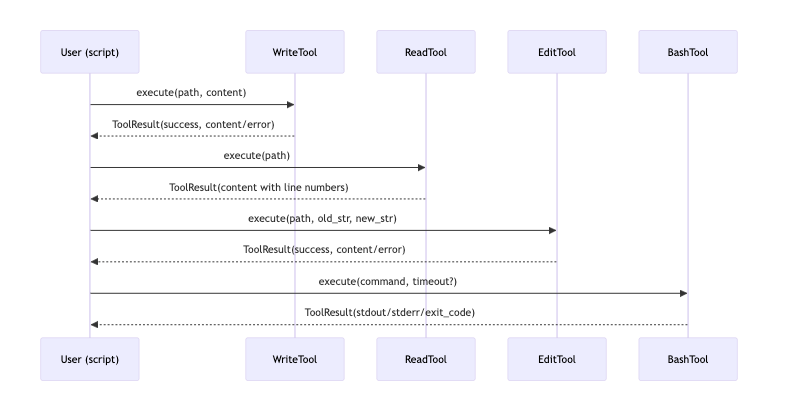
이 예제는 아래 데모를 순서대로 실행합니다.
- 임시 파일 생성:
WriteTool - 파일 읽기:
ReadTool - 파일 문자열 치환:
EditTool - 쉘 명령 실행:
BashTool
각 도구는 공통적으로 ToolResult(성공/실패, content/error)를 반환합니다. 이 “반환 계약”이 이후 Agent 루프에서 그대로 재사용됩니다.
도구를 “계약”으로 이해하기
Agent가 있다고 가정하면, 다음이 반복됩니다.
- 모델에게 “가능한 도구 목록(이름/설명/파라미터 스키마)”을 제공
- 모델이 특정 도구를 특정 인자와 함께 호출(tool call)하도록 응답
- 런타임이 실제로
tool.execute(**args)실행 - 결과를 모델에게 다시 전달(다음 스텝 컨텍스트로 축적)
01_basic_tools.py는 3번을 사람이 직접 해보면서 4번에 들어갈 결과가 어떤 모양인지 확인하는 단계입니다.
파일 도구 해설
WriteTool: “파일을 통째로 쓴다”
- 역할: 파일 생성/덮어쓰기
- 입력:
path,content - 특징: “부분 수정”이 아니라 “전체 교체”입니다.
Agent 관점 팁:
- 모델이 기존 파일을 수정할 때는 보통
read_file로 읽고, 수정 계획을 만든 뒤write_file로 전체를 다시 쓰는 전략을 택하기 쉽습니다.
ReadTool: “줄 번호를 붙여서 읽는다”
ReadTool은 결과를 "LINE_NUMBER|LINE_CONTENT" 형태로 반환합니다(1부터 시작).
이 포맷은 LLM이 “어디를 수정해야 하는지”를 정확히 지칭하는 데 도움을 줍니다.
또한 큰 파일을 위해 offset, limit을 지원합니다.
실전에서는 “컨텍스트 길이 제한” 때문에 이런 청크 읽기가 자주 필요합니다.
EditTool: “정확 문자열 치환”
- 입력:
path,old_str,new_str - 동작: 파일 전체에서
old_str을 찾아new_str로 바꿉니다.
Agent 관점 팁:
- 이 방식은 구문/AST 기반 편집이 아니라 문자열 기반이라서, 모델이
old_str를 정확히 만들어내지 못하면 실패합니다. - “여러 군데가 동시에 바뀌는 사고”를 막으려면 운영 환경에서는 유일 매칭 검증 등 방어 로직을 추가하는 게 일반적입니다(이 프로젝트는 데모 수준).
BashTool 해설
BashTool은 “쉘을 안전하게 감싼 도구”입니다. 중요한 포인트는 두 가지입니다.
1) Foreground 실행(기본)
timeout내에 끝나는 명령을 실행하고 결과(stdout/stderr/exit_code)를 돌려줍니다.- 실패 시
success=False와 함께error가 채워집니다.
2) Background 실행(run_in_background=True)
- 긴 작업(서버 실행, 빌드 등)을 위해 백그라운드 프로세스를 띄우고
bash_id를 반환합니다. - 이후 출력 확인은
bash_output(bash_id=...), 종료는bash_kill(bash_id=...)로 분리됩니다.
Agent 관점 팁:
- 긴 작업을 “즉시 완료”로 오해하지 않도록, background 실행은 tool contract 자체가 다릅니다(
bash_id관리가 필요).
flowchart TD
  Start[bash(run_in_background=true)] --> ID[bash_id 반환]
  ID --> Out[bash_output(bash_id)\n새 출력만 조회]
  ID --> Kill[bash_kill(bash_id)\n프로세스 종료]
  Out --> Out
실습 과제(에이전트 공부용)
이 예제는 도구만 다루지만, 다음 변경을 해보면 Agent 사고방식을 미리 체감할 수 있습니다.
demo_read_tool()에서ReadTool.execute(offset=..., limit=...)를 사용해 “부분 읽기”를 체험해보기demo_edit_tool()에서old_str를 일부러 틀리게 넣어서 실패를 확인해보기demo_bash_tool()에서run_in_background=True로 긴 명령을 띄우고bash_output/bash_kill흐름을 추가해보기
다음 글 안내
다음 문서인 examples/docs/02_simple_agent.md에서는 이 도구들이 실제로 Agent 루프에서 어떻게 선택되고, 어떤 형태로 “tool_calls”가 발생하는지(=모델이 도구를 호출하는 방식)를 파고듭니다.
'AI > Agent' 카테고리의 다른 글
| 6. AI Agent가 사용하는 Tool 스키마 (0) | 2026.02.23 |
|---|---|
| 5. Provider 선택자 만들기 (0) | 2026.02.23 |
| 4. Ai Agent에 세션 + MCP까지 적용 (0) | 2026.02.23 |
| 3. session_notes로 공부하는 AI 에이전트 세션 관리 (0) | 2026.02.23 |
| 2. Simple Agent (AI 에이전트 기초) (0) | 2026.02.23 |


