
- IT (1752)

오늘도 공부
Clean Architecture + Feature-First 실전 프로젝트 가이드 본문
확장 가능하고 유지보수하기 쉬운 프로젝트 구조 설계하기
들어가며
프로젝트 규모가 커지면서 "어디에 뭐가 있지?"라는 질문이 점점 더 자주 나오고 있지 않으신가요?
Feature-First 아키텍처는 이 문제를 해결하는 강력한 접근 방식입니다. 여기에 Clean Architecture를 결합하면, 비즈니스 로직이 UI나 데이터베이스에 종속되지 않는 유연한 구조를 만들 수 있습니다.
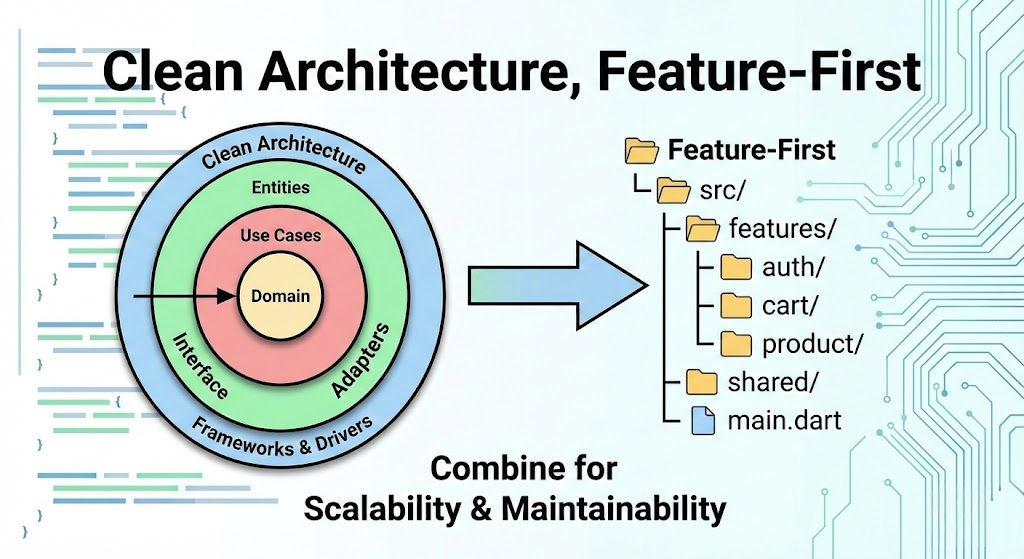
이 글에서는 두 아키텍처를 결합한 실전 프로젝트 구조를 예제와 함께 상세히 설명합니다.
Layer-First vs Feature-First
먼저 두 접근 방식의 차이를 옷장 정리에 비유해 보겠습니다.
- Layer-First: 옷을 색깔별로 정리 (흰 옷 서랍, 검은 옷 서랍)
- Feature-First: 옷을 용도별로 정리 (운동복 서랍, 정장 서랍, 잠옷 서랍)
Layer-First 구조의 문제점
대부분의 개발자가 처음 배우는 전통적인 구조입니다:
src/
├── components/   # 모든 기능의 컴포넌트가 섞여 있음
├── services/     # 인증, 결제, 상품 서비스가 섞여 있음
├── models/       # 모든 데이터 모델이 섞여 있음
├── utils/
└── main.dart
🚨 문제점: '로그인' 기능을 수정하려면 components, services, models 폴더를 전부 왔다 갔다 해야 합니다. 프로젝트가 커질수록 유지보수가 극도로 힘들어집니다.
Feature-First 구조의 해결책
비즈니스 기능(도메인)별로 폴더를 구성합니다:
src/
├── features/
│   ├── auth/      # 로그인 관련 모든 것
│   ├── cart/      # 장바구니 관련 모든 것
│   └── product/   # 상품 관련 모든 것
├── shared/        # 공통 컴포넌트, 유틸
└── main.dart
✅ 장점: '로그인' 기능을 수정하려면 features/auth 폴더만 보면 됩니다. 높은 **응집도(Cohesion)**를 달성할 수 있습니다.
Clean Architecture 핵심 개념
Clean Architecture는 로버트 마틴(Uncle Bob)이 제안한 소프트웨어 설계 철학입니다.
핵심 원칙은 "의존성은 항상 안쪽(비즈니스 로직)을 향해야 한다" 입니다.
3개의 핵심 계층
계층 역할 예시
| Domain | 순수 비즈니스 로직, 외부 의존성 없음 | Entity, UseCase, Repository 인터페이스 |
| Data | 데이터 소스와 통신, Repository 구현체 | API 호출, DB 접근, DTO, 캐싱 로직 |
| Presentation | UI와 상태 관리, 사용자 인터랙션 처리 | Screen, Widget, ViewModel, BLoC |
핵심 규칙: Domain 계층은 Data나 Presentation에 대해 아무것도 모릅니다. 이를 통해 비즈니스 로직을 프레임워크나 DB 변경으로부터 보호합니다.
Feature-First + Clean Architecture 결합
이제 두 아키텍처를 결합합니다. 각 Feature 폴더 안에서 Clean Architecture의 계층을 구현합니다. 즉, 각 기능이 하나의 '미니 앱'처럼 독립적으로 동작합니다.
이상적인 폴더 구조
실제 프로젝트에서 사용하는 구조입니다 (Flutter/React 공통 개념):
lib/
├── features/
│   ├── auth/                    # 인증 기능
│   │   ├── data/
│   │   │   ├── datasources/     # API, 로컬 DB 접근
│   │   │   ├── models/          # DTO, 서버 응답 모델
│   │   │   └── repositories/    # Repository 구현체
│   │   ├── domain/
│   │   │   ├── entities/        # 비즈니스 객체
│   │   │   ├── repositories/    # Repository 인터페이스
│   │   │   └── usecases/        # LoginUser, LogoutUser
│   │   └── presentation/
│   │       ├── pages/           # 화면 UI
│   │       ├── widgets/         # 기능 전용 위젯
│   │       └── providers/       # 상태 관리
│   │
│   ├── product/                 # 상품 기능
│   │   ├── data/
│   │   ├── domain/
│   │   └── presentation/
│   │
│   └── cart/                    # 장바구니 기능
│       ├── data/
│       ├── domain/
│       └── presentation/
│
├── core/                        # 공통 인프라
│   ├── network/                 # HTTP 클라이언트
│   ├── error/                   # 에러 처리
│   └── constants/               # 상수 정의
│
├── shared/                      # 공통 UI/유틸
│   ├── widgets/                 # 공용 버튼, 인풋
│   └── utils/                   # 날짜 변환 등
│
└── main.dart
실전 예제: 인증(Auth) 기능 구현
로그인 기능을 예로 들어 각 계층별 코드를 살펴보겠습니다.
1. Domain Layer (핵심 비즈니스 로직)
Entity: User
순수한 비즈니스 객체입니다. 외부 라이브러리 의존성이 전혀 없습니다.
// domain/entities/user.dart
class User {
  final String id;
  final String email;
  final String name;
  final DateTime createdAt;

  const User({
    required this.id,
    required this.email,
    required this.name,
    required this.createdAt,
  });

  bool get isVerified => email.contains('@');
}
Repository Interface
구현 세부사항 없이 "무엇을 할 수 있는지"만 정의합니다.
// domain/repositories/auth_repository.dart
abstract class AuthRepository {
  Future<Either<Failure, User>> login(String email, String password);
  Future<Either<Failure, Unit>> logout();
  Future<Either<Failure, User>> getCurrentUser();
}
UseCase: LoginUser
단일 비즈니스 작업을 캡슐화합니다. 테스트하기 쉽고 재사용 가능합니다.
// domain/usecases/login_user.dart
class LoginUser {
  final AuthRepository repository;

  LoginUser(this.repository);

  Future<Either<Failure, User>> call(LoginParams params) async {
    // 비즈니스 규칙 검증
    if (!params.email.contains('@')) {
      return Left(ValidationFailure('유효하지 않은 이메일'));
    }
    if (params.password.length < 8) {
      return Left(ValidationFailure('비밀번호는 8자 이상'));
    }
    return repository.login(params.email, params.password);
  }
}

class LoginParams {
  final String email;
  final String password;
  const LoginParams({required this.email, required this.password});
}
2. Data Layer (외부 시스템 연동)
Model: UserModel (DTO)
서버 응답을 파싱하고 Entity로 변환합니다.
// data/models/user_model.dart
class UserModel extends User {
  const UserModel({
    required super.id,
    required super.email,
    required super.name,
    required super.createdAt,
  });

  factory UserModel.fromJson(Map<String, dynamic> json) {
    return UserModel(
      id: json['id'] as String,
      email: json['email'] as String,
      name: json['name'] as String,
      createdAt: DateTime.parse(json['created_at'] as String),
    );
  }

  Map<String, dynamic> toJson() => {
    'id': id,
    'email': email,
    'name': name,
    'created_at': createdAt.toIso8601String(),
  };
}
DataSource: AuthRemoteDataSource
실제 API 호출을 담당합니다.
// data/datasources/auth_remote_datasource.dart
abstract class AuthRemoteDataSource {
  Future<UserModel> login(String email, String password);
  Future<void> logout();
}

class AuthRemoteDataSourceImpl implements AuthRemoteDataSource {
  final HttpClient client;

  AuthRemoteDataSourceImpl(this.client);

  @override
  Future<UserModel> login(String email, String password) async {
    final response = await client.post(
      '/api/auth/login',
      body: {'email': email, 'password': password},
    );
    if (response.statusCode == 200) {
      return UserModel.fromJson(response.data);
    }
    throw ServerException(response.message);
  }
}
Repository 구현체
Domain의 인터페이스를 구현하고, 에러 처리와 캐싱을 담당합니다.
// data/repositories/auth_repository_impl.dart
class AuthRepositoryImpl implements AuthRepository {
  final AuthRemoteDataSource remoteDataSource;
  final AuthLocalDataSource localDataSource;

  AuthRepositoryImpl({
    required this.remoteDataSource,
    required this.localDataSource,
  });

  @override
  Future<Either<Failure, User>> login(
    String email,
    String password,
  ) async {
    try {
      final user = await remoteDataSource.login(email, password);
      await localDataSource.cacheUser(user);
      return Right(user);
    } on ServerException catch (e) {
      return Left(ServerFailure(e.message));
    } on NetworkException {
      return Left(NetworkFailure('네트워크 연결을 확인하세요'));
    }
  }
}
3. Presentation Layer (UI와 상태 관리)
ViewModel / Provider
UseCase를 호출하고 UI 상태를 관리합니다.
// presentation/providers/auth_provider.dart
class AuthNotifier extends StateNotifier<AuthState> {
  final LoginUser loginUser;

  AuthNotifier(this.loginUser) : super(AuthInitial());

  Future<void> login(String email, String password) async {
    state = AuthLoading();

    final result = await loginUser(
      LoginParams(email: email, password: password),
    );

    state = result.fold(
      (failure) => AuthError(failure.message),
      (user) => AuthAuthenticated(user),
    );
  }
}

// 상태 정의
sealed class AuthState {}
class AuthInitial extends AuthState {}
class AuthLoading extends AuthState {}
class AuthAuthenticated extends AuthState {
  final User user;
  AuthAuthenticated(this.user);
}
class AuthError extends AuthState {
  final String message;
  AuthError(this.message);
}
UI: LoginPage
// presentation/pages/login_page.dart
class LoginPage extends ConsumerWidget {
  @override
  Widget build(BuildContext context, WidgetRef ref) {
    final authState = ref.watch(authProvider);

    return Scaffold(
      body: switch (authState) {
        AuthLoading() => Center(child: CircularProgressIndicator()),
        AuthError(:final message) => ErrorView(message: message),
        AuthAuthenticated(:final user) => HomeRedirect(user: user),
        AuthInitial() => LoginForm(
          onSubmit: (email, password) {
            ref.read(authProvider.notifier).login(email, password);
          },
        ),
      },
    );
  }
}
의존성 주입 (DI) 설정
모든 계층을 연결하는 의존성 주입 설정입니다. get_it 패키지를 사용한 예시:
// injection_container.dart
final sl = GetIt.instance;

void init() {
  // External
  sl.registerLazySingleton(() => HttpClient());

  // Data Sources
  sl.registerLazySingleton<AuthRemoteDataSource>(
    () => AuthRemoteDataSourceImpl(sl()),
  );
  sl.registerLazySingleton<AuthLocalDataSource>(
    () => AuthLocalDataSourceImpl(),
  );

  // Repository
  sl.registerLazySingleton<AuthRepository>(
    () => AuthRepositoryImpl(
      remoteDataSource: sl(),
      localDataSource: sl(),
    ),
  );

  // UseCase
  sl.registerLazySingleton(() => LoginUser(sl()));

  // Provider
  sl.registerFactory(() => AuthNotifier(sl()));
}
이 아키텍처의 장점
- 높은 응집도: 관련된 코드가 한곳에 모여 있어 이해와 수정이 쉽습니다.
- 쉬운 확장: 새로운 기능은 features/새기능 폴더만 추가하면 됩니다.
- 깔끔한 삭제: 기능 제거 시 해당 폴더만 삭제하면 끝입니다.
- 협업 효율: 팀원끼리 다른 기능을 맡으면 충돌이 줄어듭니다.
- 테스트 용이성: 각 계층을 독립적으로 테스트할 수 있습니다.
- 프레임워크 독립성: Domain 계층은 어떤 프레임워크에서도 재사용 가능합니다.
주의사항 및 팁
Shared/Core 활용
모든 것이 Feature 안에 들어갈 수는 없습니다. 여러 기능에서 공통으로 사용하는 것들은 별도로 분리합니다:
- core/: HTTP 클라이언트, 에러 처리, 상수 정의
- shared/: 공용 UI 컴포넌트(버튼, 인풋), 유틸리티 함수
언제 이 구조를 사용할까?
- 프로젝트 규모가 중형 이상으로 예상될 때
- 장기간 유지보수가 필요한 프로덕션 앱
- 팀 규모가 2명 이상일 때
- 비즈니스 로직이 복잡한 도메인
과도한 추상화 피하기
작은 프로젝트에서는 오버엔지니어링이 될 수 있습니다. MVP나 프로토타입에서는 단순한 구조로 시작하고, 필요에 따라 점진적으로 리팩토링하는 것을 권장합니다.
마무리
Feature-First + Clean Architecture는 "관련된 것끼리 모으고, 의존성은 안쪽으로"라는 두 가지 원칙을 결합한 강력한 설계입니다.
처음에는 다소 복잡해 보일 수 있지만, 프로젝트가 성장할수록 그 가치를 실감하게 됩니다.
이 구조를 적용하면 "어디에 뭐가 있지?"라는 질문 대신 "auth 폴더를 보면 되겠네"라고 자신있게 말할 수 있게 됩니다.
Happy Coding! 🚀
'스터디' 카테고리의 다른 글
| 고등학교 중퇴자가 OpenAI 연구원이 된 방법: Gabriel Petersson의 AI 활용 학습법 (0) | 2025.12.20 |
|---|---|
| SQL 완전 정복: SQL 핵심 개념 총정리 (0) | 2025.11.06 |
| 우분투 24이상에서 몽고디비 8.0이상 설치후 인증,원격 허용까지 (0) | 2025.11.04 |
| 웹에서 사용하는 저장소 종류 (0) | 2025.07.02 |
| PostgreSQL 권한 및 스키마에 대한 이해 (0) | 2025.06.10 |